If you are self-employed, your income tax obligations are more complex than those of W-2 workers, but the good news is that QuickBooks Online can help.
Whether or not you knew about the income tax requirements for self-employed individuals before you launched your business, here you are. If 2026 is your first year striking out on your own, you need to be very clear on how you’re expected to handle this critical element of your business finances. Even if you’ve been operating for a while, it’s important to ensure full compliance.
You’re responsible not only for earning the income but also for tracking it, organizing it and your expenses, and paying taxes on time. No one withholds taxes for you like they do W-2 employees, so staying organized throughout the year is essential. QuickBooks Online can make this process much easier. Here’s how.
Understanding Your Tax Obligations
Before we explore how QuickBooks Online can help, it’s important to understand your responsibilities. Self-employed individuals typically owe:
- Income tax,
- Self‑employment tax (covering Social Security and Medicare),
- Quarterly estimated taxes, and,
- State and local taxes (possibly).
Knowing these requirements helps you use QuickBooks Online more effectively—not just as bookkeeping software, but as a tax‑readiness tool.
Tracking Income Accurately
Accurate income tracking is the foundation of tax preparation. QuickBooks Online simplifies this through invoicing tools, bank feeds, and reports.
Invoicing triggers background income bookkeeping. When you create invoices in QuickBooks Online, they’re recorded and stored. When you enter payments, they can be matched to their corresponding invoices. This eliminates guesswork later when you’re trying to figure out who paid you, when, and for what. QuickBooks Online will track your income, so you’ll be able to report it accurately later when you’re preparing taxes.
Connected bank accounts import both those payments and cleared deposits. When you connect QuickBooks Online to your financial institutions, it pulls in deposits that you’ve made and records them. This greatly reduces manual data entry. The site also helps you classify this data, so you know which transactions are tax related.
Staying on Top of Expenses
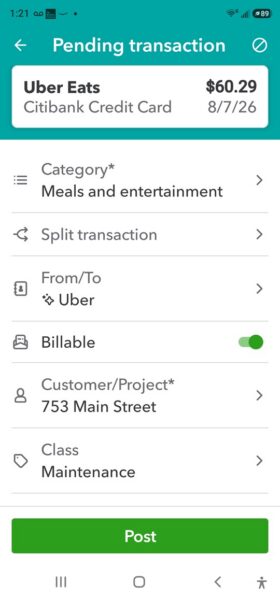 Self-employed individuals can use QuickBooks Online to record and track tax-related expenses, either on the mobile app or website.
Tracking income in preparation for income taxes is the—relatively—easy part. As a self-employed individual, you get paid through a variety of sources. Maybe you take credit/debit cards or bank (ACH) payments. You might allow customers to pay you through services like Venmo or Stripe. You might accept cash and checks. Your digital sales will be reported to you in January each year via statements from third parties or IRS forms like the 1099-K and 1099-NEC.
However, the cost of doing business, your expenses, will offset that income. Recording, categorizing, and tracking tax-related business expenses is absolutely essential for self-employed individuals. It’s exacting work, but you will miss out on deductions if you don’t report on everything you’ve spent. QuickBooks Online helps here by providing the categories that the IRS includes on Schedule C, which you’ll complete and submit along with your Form 1040.
QuickBooks Online can make this process more automated and accurate. It also helps you provide the documentation that you’ll need to calculate your taxes and be prepared in case you’re ever audited. By allowing you to import and categorize transactions, the site keeps a running tally of your business expenses. The QuickBooks Online mobile app allows you to snap photos of receipts that are then attached to its expense forms. You can also use the app to track your business mileage in real time by connecting your smartphone to your vehicle.
Warning: Try to avoid mixing personal and business expenses. You should only be using QuickBooks Online for business bookkeeping, but you may have checking accounts and/or credit cards that you use for both. If you haven’t already, open a dedicated business checking account and credit or debit card. It’s one of the simplest ways to keep your books clean and avoid IRS headaches. You don’t want to inflate your business deductions or distort your profit (or loss). If you absolutely must mix them, let us help you categorize them correctly. We can explain how QuickBooks Online can split a transaction that has both business and personal purchases.
Estimating Your Quarterly Taxes
All this entering and categorizing and tracking will, of course, come into play when you prepare your annual income taxes, but you may know that self-employed individuals are required to estimate what they will owe in taxes each quarter and submit that amount to the IRS and any state agencies to whom they pay taxes. You can send in a check or money order along with the correct payment voucher from the Form 1040-ES or pay electronically.
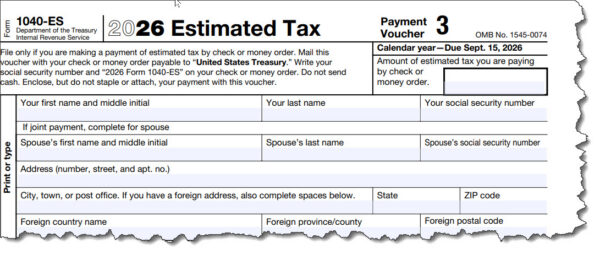
There’s no way to know exactly what you will owe every three months. That’s why they’re called estimated taxes. A good rule of thumb is to save 25–30% of your income for this purpose. There are reports in QuickBooks Online that you can create to help here. They include:
- Profit and Loss,
- Expense by Vendor, and,
- Sales by Customer.
QuickBooks Online Offers Targeted Tools
If you’re conscientious about connecting all your accounts and keeping up with your daily or weekly workflow, you should be able to get the numbers you need to prepare your income taxes. But QuickBooks Online provides some specialized tools to help. Click on All apps in the toolbar and then scroll down to Business Tax and click Overview. Here, you can access links to uncategorized transactions and deposits, look for standard or industry-specific deductions you may have missed, and view a Tax summary that tallies your income and deductions and an estimate of your self-employment tax.
Final Thoughts
Preparing for taxes as a self-employed individual can be overwhelming. With QuickBooks Online, you can turn tax prep into a manageable, predictable routine. By tracking income, organizing expenses, estimating quarterly taxes, and running the right reports, you should be able to stay compliant, reduce stress, and maximize your deductions. If you have questions, please reach out to our QuickBooks team to learn more.
Reminder
Don’t forget that QuickBooks Desktop will be sunsetting in May of 2027, making now an important time to switch over to QuickBooks Online if you haven’t already. Please reach out to us to schedule a consultation to learn more.
Sign Up for our Monthly QuickBooks Newsletter
Get the latest updates delivered straight to your inbox!