



Putting a value on tangible property donations

Guidance You Can Count On

Our Insights

  • #
    Back to Insights

QuickBooks Online can boost your profitability—if you take full advantage of some of its more effective tools.

We like QuickBooks Online for a lot of reasons. It’s designed for small business owners, not accountants, so its language and processes are understandable. It offers all the tools you need to manage your income and expenses. It provides tools for tracking inventory, creating projects, and running payroll. It generates reports. Plus, it’s highly customizable, so no matter what kind of business you own, you can make it work for you

QuickBooks Online’s bookkeeping capabilities can ensure that you get the numbers right, but its benefits go beyond that. Many of its tools can actually help you make changes to improve your company’s profitability if you commit to using them regularly. Try incorporating these five features into your regular workflow for three months and see how they can:

1. Improve Customer Relationships

Your customers are good, and it’s often well-worth your time to cultivate good, long-lasting relationships with them. If you haven’t seen their name on an invoice for a while, send them a friendly, personalized email offering a one-time discount. Or tell them about new products and/or services that they might like. And don’t neglect your best customers. Let them know occasionally that you appreciate their business by sending them a freebie.

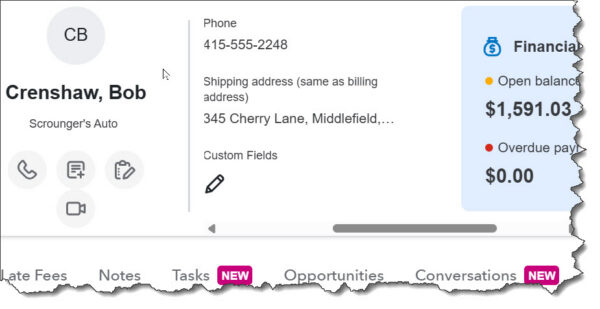
QuickBooks Online provides exceptionally detailed customer records that can give you quick insight into your customers’ history, their current status, and future opportunities. Beyond basic contact information, customer records offer comprehensive transaction lists and activity feeds that document your interaction with them. You can take notes and assign tasks, browse projects you’ve done for them, and see their current open balance and any missing payments. Connect Gmail or Outlook to QuickBooks Online, and you’ll be able to store conversations with them right in their records. You’ll find customer records by clicking the Home button in the toolbar, then Customer Hub, then Customers & Leads.

Sales by Customer

Maintain your customer records diligently, and QuickBooks Online can serve as a customer relationship manager (CRM). The Sales by Customer report can be a big help here.

2. Help Maintain Smart Inventory Levels

If you sell products, you know what a balancing act inventory management can be. Carry too much and you may be tying up more money than you need to. Cut your levels too close, and you risk not being able to fulfill some orders – and maybe even losing customers.

QuickBooks Online can help you track your inventory so you can minimize those problems. You’ll know instantly when you go to the inventory home page which stock levels are low, what your best sellers are, and whether there are any open sales orders or purchase orders. Inventory records provide details about each item. They also tell you what the quantity on hand is and whether any are on purchase order or sales order, as well as the reorder point that you set. Reports that are helpful here include Inventory Valuation Summary/Detail and Sales by Product/Service Summary and Detail.

To see inventory pages in QuickBooks Online, click All apps in the toolbar, then Inventory.

3. Accelerate Customer Payments

This is probably the most formidable problem that small businesses face. How do you get your customers to pay on time? You can, for example:

  • Charge late fees.
  • Decrease the number of days until the due date.
  • Offer a small discount for early payment.

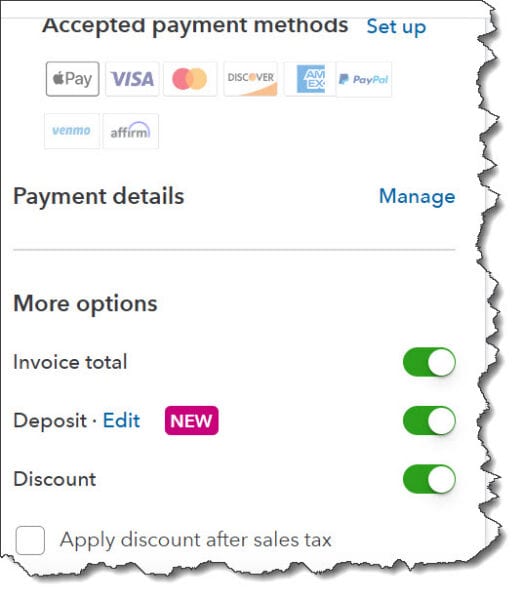
Probably the best way to encourage timely remittances is to allow customers to pay electronically. You’ll need to set up a merchant account through QuickBooks Payments. Customers will be able to pay directly through an invoice, on site or in a store, or digitally (ACH and credit/debit cards, Apple Pay, PayPal, Venmo, etc.). Transaction fees will apply.

Payment methods

You can speed up payments by giving customers more convenient, faster options.

4. Improve Your Cash Flow

It all comes down to how much is coming in vs how much is going out. Keeping a close watch on your cash flow is critical. Positive cash flow is not the same thing as profitability, but the two are, of course, closely related. QuickBooks Online provides ways for you to monitor this. Click the Home button in the toolbar and scroll down until you see the Cash Flow graph. This will give you a quick look at todays and your historical cash flow. If this snapshot doesn’t mean anything to you (and it may not; it’s pretty simple), we can analyze your situation by running and analyzing QuickBooks Online’s report, Statement of Cash Flows.

5. Keep Track of Your Digital Paperwork

How do you keep track of what invoices have been paid? You can always run a report that you should be running regularly: Accounts Receivable Aging Summary. This will spell out who owes you money and who is late sending it in. Though you can customize this report, the default view will show you a list of customers’ (and related jobs’) names with six additional columns showing whether they’re up to date or a certain number of days (by range) late: Current, 1-30, 31-60, 61-90, 91 and over, and Total.

You can also see a visual of your outstanding customer payments. Click Home, then Sales & Get Paid, then Sales transactions. Colored bars at the top of this page show you how much money is tied up in Estimates, Unbilled income, Overdue invoices, Open invoices and credits, and Recently paid. Click on any bar to see a list of related transactions below.

Final Thoughts

QuickBooks Online can, in many small ways, help you achieve profitability, but it takes diligence on your part. If you’re not already taking these five steps regularly, try to work them into your accounting workflow. Taken together, along with the other things you do to get profitable and stay profitable, you should see your smart use of QuickBooks Online pay off. If you have questions, please reach out to our QuickBooks team to learn more.

Reminder

Don’t forget that QuickBooks Desktop will be sunsetting in May of 2027, making now an important time to switch over to QuickBooks Online if you haven’t already. Please reach out to us to schedule a consultation to learn more.


Sign up for our monthly QuickBooks newsletter for the latest updates


If a donor suddenly offered your not-for-profit a residential property, antique jewelry or inventory from a business, would you know how to value it? Perhaps you don’t receive these types of contributions often, but you also don’t want to turn them down. If a property donation relates to your organization’s tax-exempt function, it’s generally valued based on its fair market value (FMV). But there are exceptions to this rule. Let’s take a look.

Open market price

FMV typically is defined as the price property would likely sell for on the open market. If, for example, a donor contributes used clothes for a charity to distribute to disaster victims, the FMV would be the price that typical buyers would pay for clothes of the same age, condition, style and use. However, if donated property is subject to any type of restriction on its use, the FMV must reflect it. Restrictions often are an issue with donated real estate. If, for instance, real estate isn’t eligible for commercial development, that may reduce its FMV.

If donated items are unrelated to your nonprofit’s exempt purpose and you plan to sell them, their value may also be different. In such cases, the deduction value is generally limited to the donor’s cost basis.

3 factors

There are three relevant FMV factors:

  1. Cost or selling price. This is the amount the donor paid for the item or the actual selling price received by your organization. But because market conditions can change, the cost or price becomes less important the further in time the purchase or sale is from the contribution date.
  2. Comparable sales. This is the sales price of property similar to the donated property. The IRS may give more or less weight to a comparable sale depending on the similarity between the property sold and the donated property, the time of the sale, the circumstances of the sale, and general market conditions.
  3. Replacement cost. FMV should consider the cost of buying or creating property similar to the donated item. However, the replacement cost must have a reasonable relationship with the FMV.

Note an exception: Businesses that donate inventory can usually deduct only the smaller of the inventory’s FMV on the day of the contribution or the inventory’s “basis.” The basis is any cost incurred for the inventory in an earlier year that the business would otherwise include in its opening inventory for the year of the donation. If the cost of donated inventory isn’t included in the opening inventory, its basis is zero and the business can’t claim a deduction.

Also, for tangible property donations valued at more than $5,000, donors must obtain a written appraisal to deduct their gift on their tax return. Appraisers must be “qualified,” meaning they’re experts in the area of the property being evaluated and are independent of your organization.

Multiple uses

Valuing tangible property donations isn’t only important for donors’ charitable tax deductions. You’ll also need to assign accurate values in your nonprofit’s financial statements — and these values may sometimes be different from the amounts the donors are eligible to deduct. Visit our related service page for more information on our nonprofit services.

© 2025

Talk to an Expert

Get personalized guidance for your situation.

Recent Insights

Ready to Take the Next Step?

Our team is here to provide guidance you can count on.